> For the complete documentation index, see [llms.txt](https://docs.airops.com/llms.txt). Markdown versions of documentation pages are available by appending `.md` to page URLs; this page is available as [Markdown](https://docs.airops.com/insights/onsite/pages.md).
# Pages
Marry traditional SEO data with AI search performance in a unified view, enabling sophisticated content prioritization strategies.
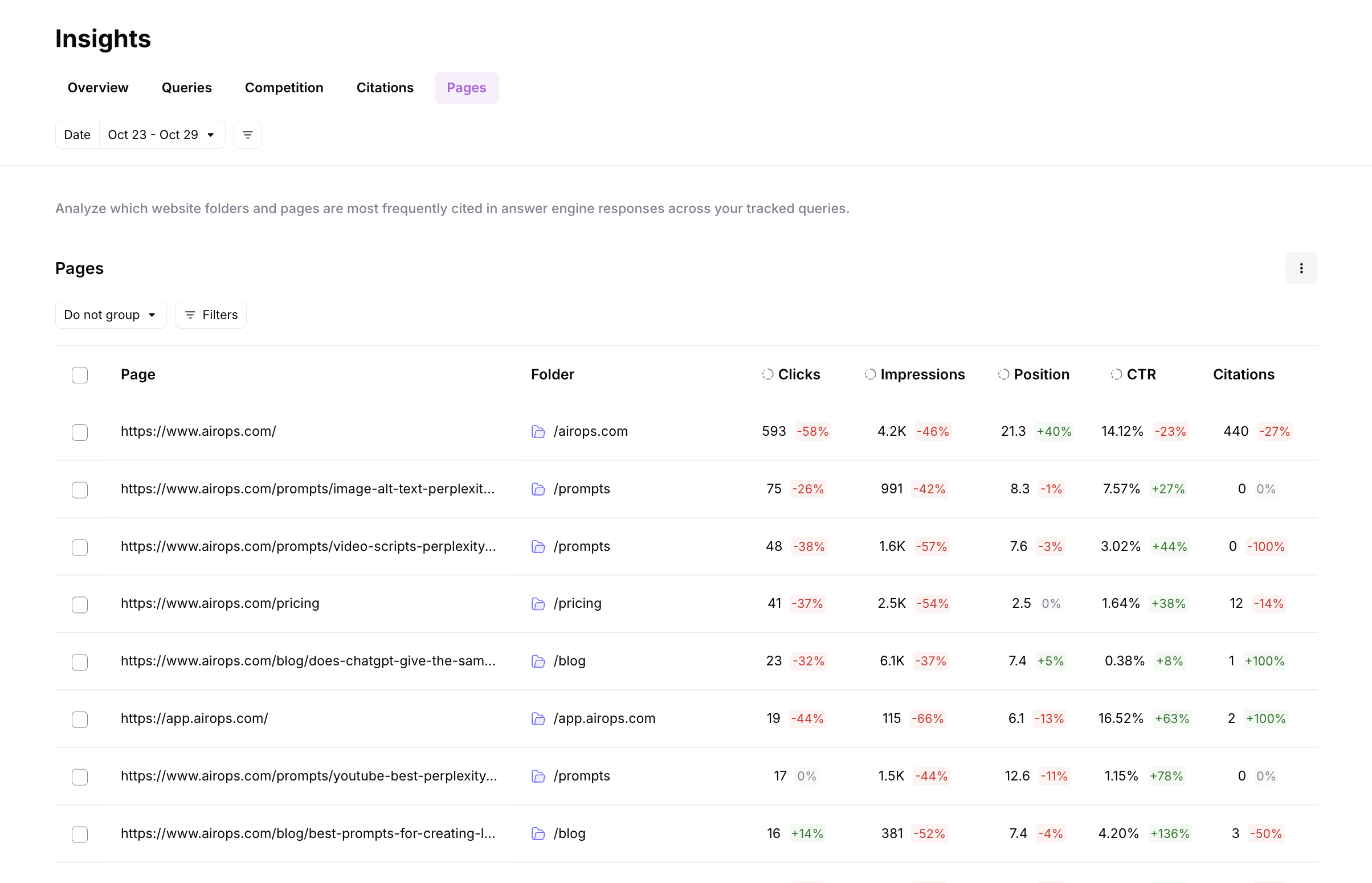
The Pages view combines traditional SEO metrics with AI search performance data in a single interface, giving you a complete picture of how your content performs across both search paradigms. This unified view enables sophisticated content prioritization strategies based on what matters most to your business.
Other tools show you AI search data in a silo. We believe that's the wrong approach. Your team needs to see SEO and AI search together because you're optimizing for both. By integrating Google Search Console, AI Search, and Google Analytics 4 data, you can identify high-impact optimization opportunities that would be invisible when looking at these metrics separately.
Use the Pages view to create custom filters that surface your highest-priority content, then take bulk action to refresh, optimize, or create new content at scale.
## Where Pages Come From
Pages are added to AirOps through these sources:
| Source | Description |
| ----------------------- | ------------------------------------------------------------------------------------------------------------------------------ |
| **AI Search Citations** | Pages are created automatically when your site is cited in AI search responses to the prompts you're tracking. |
| **Sitemap Upload** | Pages are created when you upload a sitemap. |
| **MCP** | Use `create_page` to add a URL that belongs to your Brand Kit's AEO domain. See [MCP tools](/developers/tools.md#create_page). |
Google Analytics 4 and Google Search Console do not create pages on their own. They enrich pages that were added from AI search citations or sitemap upload with traffic, engagement, selected conversions or key events, clicks, impressions, CTR, and position data.
{% hint style="info" %}
**Coming soon:** Page management functionality including exclusion lists will allow you to filter out pages you don't want to track (e.g., utility pages, sub-domains, or deprecated content).
{% endhint %}
## Manage table columns
Open **Manage columns** in the table toolbar to show, hide, or reorder configurable columns, then select **Save changes**. Closing the dialog without saving discards your edits. Required columns remain visible in their fixed positions.
Your layout applies to this Brand Kit and table, including grouped and ungrouped views. Preferences stay in this browser and reset if you clear browser storage.
Drag a resizable column's header edge to widen it. Expanding a column beyond the available table width adds horizontal scrolling.
## Check sitemap crawl status
Open the sitemap status control on **Pages** to inspect each source's latest crawl. The status distinguishes **Crawl queued**, **Crawling now**, **Sitemap crawled**, and **Sitemap crawl failed**.
Completed crawls show when they finished and, when available, how many pages were found and how many new pages were added. These counts can differ because an existing page does not need to be added again. Check the per-source status when the summary reports a failed crawl.
## Integrated Data Sources
The Pages view combines three critical data sources for each URL:
### Google Search Console (GSC) Data
* **Clicks:** Total clicks from organic search
* **Impressions:** Number of times your page appeared in search results
* **Average Position:** Your average ranking position
* **Click-Through Rate (CTR):** Percentage of impressions that result in clicks
### AI Search Data
* **Citations:** Number of times your page is referenced in AI responses
* **Citation Rate:** Percentage of relevant prompts where your page is cited
* **Prompts triggered:** Which tracked prompts result in citations to this page
### Google Analytics 4 (GA4) Data
* **Traffic:** Total sessions and users
* **Engagement metrics:** User interaction and behavior data
* **Sessions:** Total session count
* **Average session duration:** How long users spend on the page
* **Selected conversions or key events:** Results for the business outcomes selected in [GA4 settings](/insights/analytics/settings/google-analytics-4.md)
## Page Detail View
Click into any page to see a complete performance overview combining AI Search, GSC (SEO), and GA4 traffic, engagement, and selected conversion data in one place.
### Summary Metrics
At the top of the page detail view, you'll see three key metrics with period-over-period change indicators:
| Metric | Description |
| ------------------ | ---------------------------------------------------------------------------------------- |
| **Citation Rate** | How often this page is cited in AI responses (percentage of answers that cite this page) |
| **Citation Share** | This page's portion of total citations across all your tracked pages |
| **Unique Prompts** | Number of distinct prompts where this page has been cited |
### Performance Charts
Four time series charts show how the page is performing over your selected date range:
* **Citation Rate**: How often this page is cited in AI responses, trended over time. Use the dropdown to filter by overall or by specific brand.
* **Citation Share**: This page's portion of total citations, trended over time.
* **Clicks**: Times users clicked this page in Google search results (from GSC data).
* **Traffic**: Number of users who visited this page (from GA4 data).
Each chart shows daily values with the ability to identify trends and correlate changes across AI search and traditional SEO performance.
### Prompt Citations
The Prompt Citations table shows which prompts are driving citations to this page:
| Column | Description |
| ------------------- | --------------------------------------------------------------- |
| **Prompt** | The specific question or prompt where this page was cited |
| **Related Keyword** | The associated keyword for the prompt |
| **Prompt Type** | Whether the prompt is Brand Related or Category Related |
| **Prompt Volume** | Relative search volume (Very Low, Low, Medium, High, Very High) |
| **Mention Rate** | How often your brand is mentioned in responses to this prompt |
| **Citation Rate** | How often this specific page is cited for this prompt |
Use this table to understand which prompts are driving AI visibility for the page and identify optimization opportunities.
## Custom Prioritization Strategies
Not everyone optimizes the same way. Create filters based on what matters to YOUR business by combining metrics across data sources.
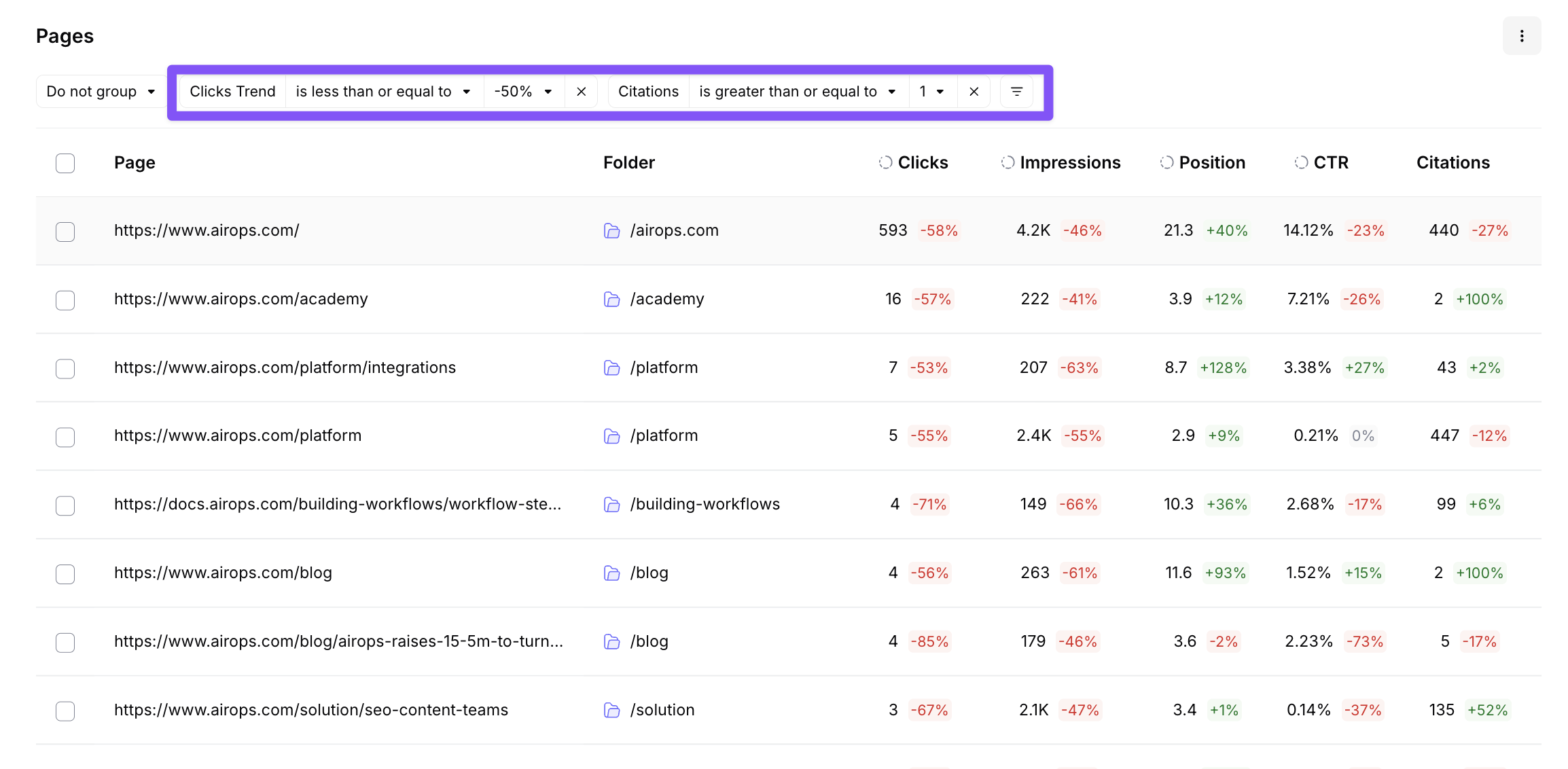
### Example Prioritization Strategy
Filter for pages that:
* Lost 50% or more clicks (declining SEO performance)
* Have at least 1 AI citation (proven AI search potential)
**Result:** Prime refresh candidates with validated AI search relevance but declining traditional SEO performance.
### Other Common Strategies
* **Quick wins:** High impressions + low CTR + high citation rate = optimize for traditional SEO while maintaining AI presence
* **AI opportunity:** Strong SEO performance + zero citations = add structured data and optimize for AI citations
* **Traffic protection:** High traffic + declining citations = refresh content to maintain AI visibility
* **Business impact:** Meaningful conversion activity + low or declining citations = prioritize a refresh for a page tied to business outcomes
* **New content gaps:** Zero citations + competitor citations present = create new content targeting those prompts
## Bulk Action Capability
{% @arcade/embed url="" flowId="8CYHVrxDl7vwLagshn0f" %}
Take action at scale directly from the Pages view:
* **Select multiple pages** using the checkboxes on the left side of each row
* **Create New Grid**: Generate a new Grid pre-populated with your selected pages
* **Add to Existing Grid**: Append selected pages to any existing Grid. A mapping modal appears so you can map page data to the appropriate Grid columns.
* **Create opportunities** for refresh, optimization, or new content creation
* **Launch workflows** directly from this view
Bulk actions enable you to move from insight to execution efficiently, processing dozens or hundreds of pages based on your prioritization criteria.
---
# Agent Instructions
This documentation is published with GitBook. GitBook is the documentation platform designed so that both humans and AI agents can read, navigate, and reason over technical content effectively. Learn more at gitbook.com.
## Querying This Documentation
If you need additional information that is not directly available in this page, you can query the documentation by asking a question.
Perform an HTTP GET request on the following URL with the `ask` and `goal` query parameters:
```
GET https://docs.airops.com/insights/onsite/pages.md?ask=&goal=
```
`ask` is the immediate question: it should be specific, self-contained, and written in natural language.
`goal` is what the user is ultimately trying to achieve, the reason they need the answer. Sharing it helps GitBook give you a better, more relevant answer. A goal is most helpful when it describes the outcome the user wants rather than restating the question. For example, with `ask=how do I create an API token`, a goal like `automate deployments from our CI pipeline` lets GitBook tailor the answer to that use case.
The response will contain a direct answer to the question and relevant excerpts and sources from the documentation.
Use this mechanism when the answer is not explicitly present in the current page, you need clarification or additional context, or you want to retrieve related documentation sections.