> For the complete documentation index, see [llms.txt](https://docs.airops.com/llms.txt). Markdown versions of documentation pages are available by appending `.md` to page URLs; this page is available as [Markdown](https://docs.airops.com/docs/pt/contexto/memory-stores/add-data.md).
# Adicionar Dados
## Carregamento de Dados para a Base de Conhecimento
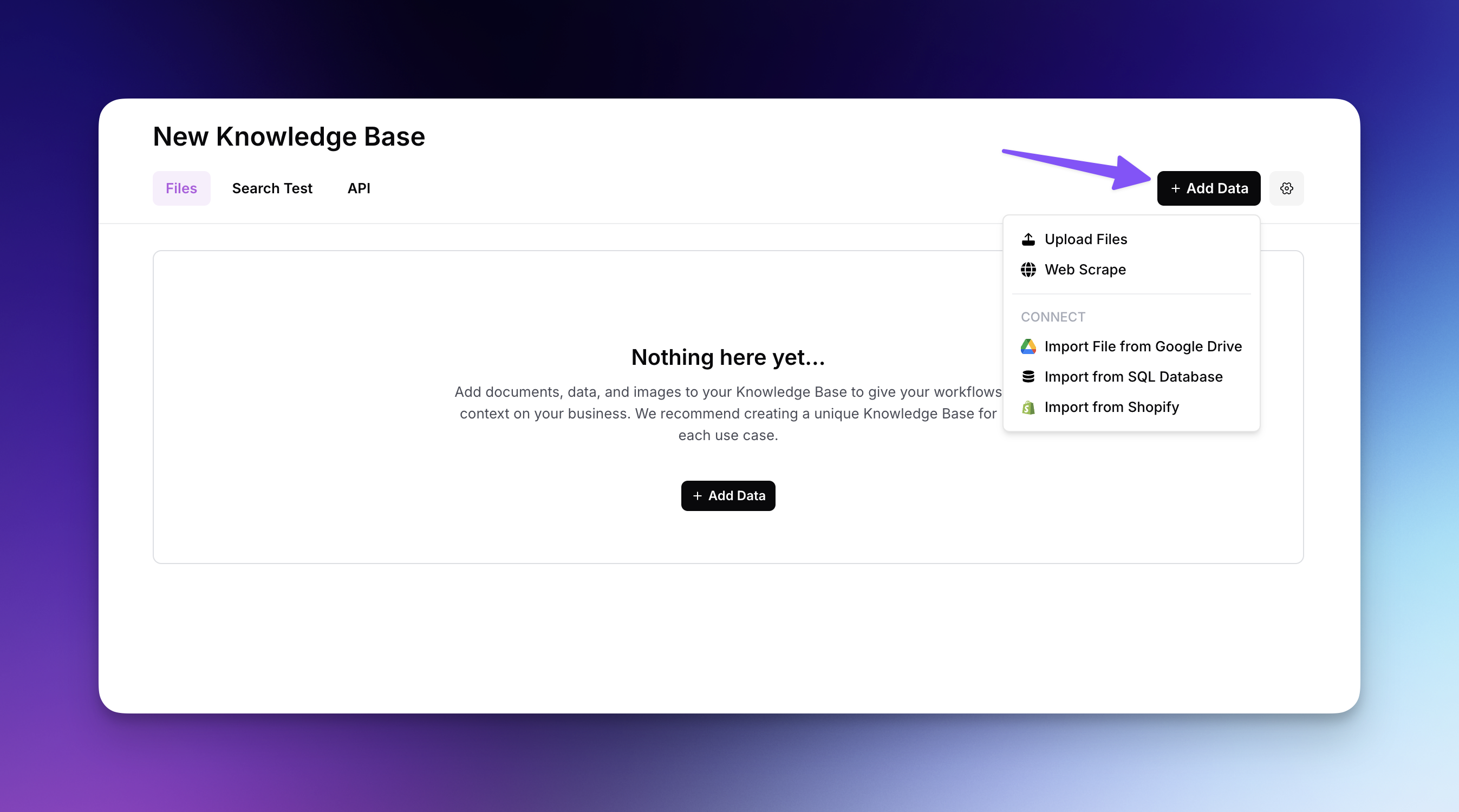
As Bases de Conhecimento da AirOps suportam uma vasta variedade de formatos de ficheiro, incluindo PDFs, CSVs, ficheiros de texto, HTML, imagens, documentos do Microsoft Office e muito mais, com opções adicionais para importar conteúdo diretamente de Sitemaps, Google Drive, bases de dados SQL, ou até Shopify! Pode adicionar conteúdo facilmente ao carregar ficheiros individualmente, fazer scraping de websites ou importar dados através da interface intuitiva, criando um rico recurso de informação pesquisável para os seus fluxos de trabalho de IA.
## Tipos de Conteúdo Suportados
Atualmente, a AirOps suporta os seguintes tipos de conteúdo para preencher Bases de Conhecimento:
1. **Carregamento de Ficheiros**: Adicione ficheiros individuais. Os formatos suportados incluem: .pdf, .csv, .txt, .text, .log, .html, .htm, .md, .org, .odt, .ppt, .pptx, .rst, .rtf, .tsv, .doc, .docx, .xml, .png, .jpg, .jpeg, .gif, .webp, .eml, .msg, .epub.
2. **Raspagem de página web**: Importe conteúdo a partir da hierarquia de páginas de um sitemap para rastrear
1. **Importar Sitemap**: Importe conteúdo a partir da hierarquia de páginas de um sitemap para rastrear
2. **Importar a partir de URL**: Importe conteúdo diretamente de um URL específico
3. **Sincronizar Ficheiro do Google Drive**: Ligue um ficheiro do Google Drive (suporta Google Docs, Google Sheets e ficheiros .pdf)
4. **Sincronizar Base de Dados SQL**: Importe dados diretamente da(s) sua(s) base(s) de dados ligada(s) através de uma consulta SQL
5. **Importar do Shopify**: Importe produtos e coleções da sua loja Shopify
{% hint style="info" %}
Atualmente, os documentos individuais têm de ser carregados um de cada vez. Se tiver requisitos mais avançados de carregamento de conteúdo, fale com a nossa equipa.
{% endhint %}
---
# Agent Instructions
This documentation is published with GitBook. GitBook is the documentation platform designed so that both humans and AI agents can read, navigate, and reason over technical content effectively. Learn more at gitbook.com.
## Querying This Documentation
If you need additional information that is not directly available in this page, you can query the documentation by asking a question.
Perform an HTTP GET request on the following URL with the `ask` and `goal` query parameters:
```
GET https://docs.airops.com/docs/pt/contexto/memory-stores/add-data.md?ask=&goal=
```
`ask` is the immediate question: it should be specific, self-contained, and written in natural language.
`goal` is what the user is ultimately trying to achieve, the reason they need the answer. Sharing it helps GitBook give you a better, more relevant answer. A goal is most helpful when it describes the outcome the user wants rather than restating the question. For example, with `ask=how do I create an API token`, a goal like `automate deployments from our CI pipeline` lets GitBook tailor the answer to that use case.
The response will contain a direct answer to the question and relevant excerpts and sources from the documentation.
Use this mechanism when the answer is not explicitly present in the current page, you need clarification or additional context, or you want to retrieve related documentation sections.