> For the complete documentation index, see [llms.txt](https://docs.airops.com/llms.txt). Markdown versions of documentation pages are available by appending `.md` to page URLs; this page is available as [Markdown](https://docs.airops.com/docs/pt/acoes/workflow-concepts/workflow-steps/logic-steps/text.md).
# Escrever texto Liquid
Formate a sua saída numa string
## Como funciona o Passo de Texto?
O Passo de Texto permite aos utilizadores concatenar os resultados dos passos anteriores numa única string. É mais ხშირად utilizado como o passo final no seu fluxo de trabalho para garantir que o resultado final está estruturado exatamente da forma que pretende.
{% hint style="info" %}
Os Passos de Texto são também uma ótima opção para extrair vários valores armazenados em listas ou arrays que possa querer concatenar numa única string.
{% endhint %}
## Como Configurar um Passo de Texto?
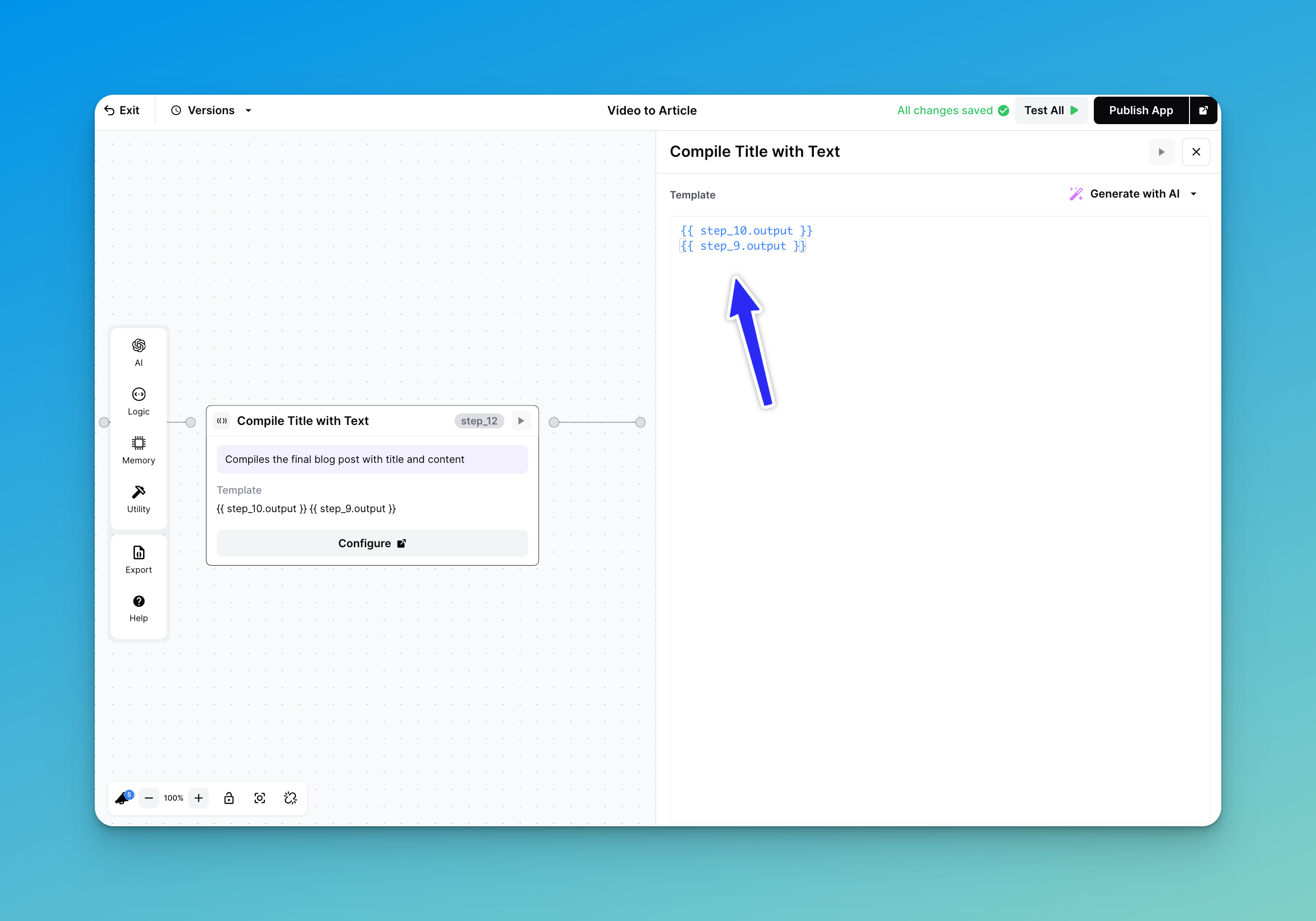
A implementação mais básica de um Passo de Texto é simples. Só precisa de referenciar as variáveis desejadas ou os resultados dos passos usando a sintaxe Liquid, como mostrado abaixo:
Junte os seus passos anteriores
Neste exemplo, o nosso Passo de Texto está a concatenar o Passo 10 (gerar um título) com o Passo 9 (gerar o conteúdo do artigo). Assim, o resultado final é um artigo formatado corretamente, com o título seguido do corpo.
## Concatenar o Resultado de um Passo de Iteração
Um dos casos de utilização mais populares de um Passo de Texto é extrair valores de um Passo de Iteração. A formatação geral para isto é:
```
{% for chunk in step_x.output %}
{{chunk}}
{% endfor %}
```
com "step\_x" a representar o seu Passo de Iteração, e "chunk" a ser os valores que queremos obter. Vejamos outro exemplo:
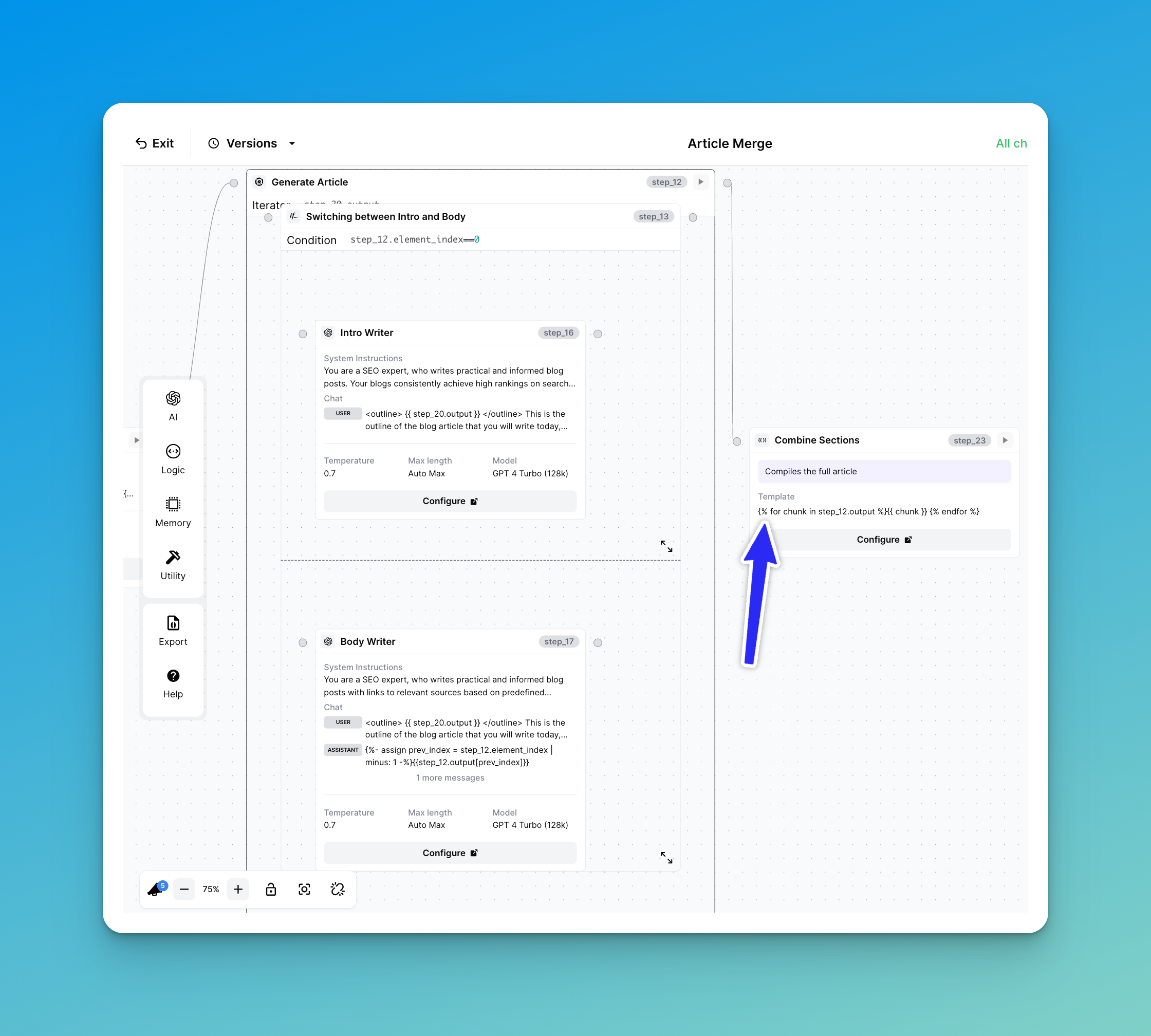
Concatenar valores obtidos do Passo de Iteração
Isto é obtido diretamente do nosso template "Article Merge". O nosso Passo de Iteração (step\_12) verifica se está a escrever uma introdução para o nosso artigo ou se está a escrever o corpo do artigo. Ao chamar o nosso Passo de Texto como:
```
{% for chunk in step_12.output %}
{{ chunk }}
{% endfor %}
```
Estamos efetivamente a combinar os resultados de cada parte numa única string.
---
# Agent Instructions
This documentation is published with GitBook. GitBook is the documentation platform designed so that both humans and AI agents can read, navigate, and reason over technical content effectively. Learn more at gitbook.com.
## Querying This Documentation
If you need additional information that is not directly available in this page, you can query the documentation by asking a question.
Perform an HTTP GET request on the following URL with the `ask` and `goal` query parameters:
```
GET https://docs.airops.com/docs/pt/acoes/workflow-concepts/workflow-steps/logic-steps/text.md?ask=&goal=
```
`ask` is the immediate question: it should be specific, self-contained, and written in natural language.
`goal` is what the user is ultimately trying to achieve, the reason they need the answer. Sharing it helps GitBook give you a better, more relevant answer. A goal is most helpful when it describes the outcome the user wants rather than restating the question. For example, with `ask=how do I create an API token`, a goal like `automate deployments from our CI pipeline` lets GitBook tailor the answer to that use case.
The response will contain a direct answer to the question and relevant excerpts and sources from the documentation.
Use this mechanism when the answer is not explicitly present in the current page, you need clarification or additional context, or you want to retrieve related documentation sections.