> For the complete documentation index, see [llms.txt](https://docs.airops.com/llms.txt). Markdown versions of documentation pages are available by appending `.md` to page URLs; this page is available as [Markdown](https://docs.airops.com/docs/es/contexto/memory-stores/add-data/import-from-sql-database/data-sources.md).
# Fuentes de datos
Conéctate a tu almacén de datos o base de datos en AirOps
AirOps facilita la conexión a diversas fuentes de datos, incluidas: almacenes de datos, bases de datos, APIs y bases de datos vectoriales. Esto le permite entrenar sus Modelos de Lenguaje de Gran Tamaño directamente en sus propias bases de datos y sistemas integrados, y liberar por completo el poder de la IA.
## Fuentes de datos compatibles
AirOps actualmente admite las siguientes fuentes de datos:
* [BigQuery](/docs/es/contexto/memory-stores/add-data/import-from-sql-database/data-sources/bigquery.md)
* [Postgres](/docs/es/contexto/memory-stores/add-data/import-from-sql-database/data-sources/postgres.md)
* [Redshift](/docs/es/contexto/memory-stores/add-data/import-from-sql-database/data-sources/redshift.md)
* [Snowflake](/docs/es/contexto/memory-stores/add-data/import-from-sql-database/data-sources/snowflake.md)
Estamos trabajando constantemente para ampliar nuestras opciones de conectividad, así que si te interesa solicitar una integración o tienes alguna sugerencia, ¡no dudes en hacérnoslo saber!
## Primeros pasos
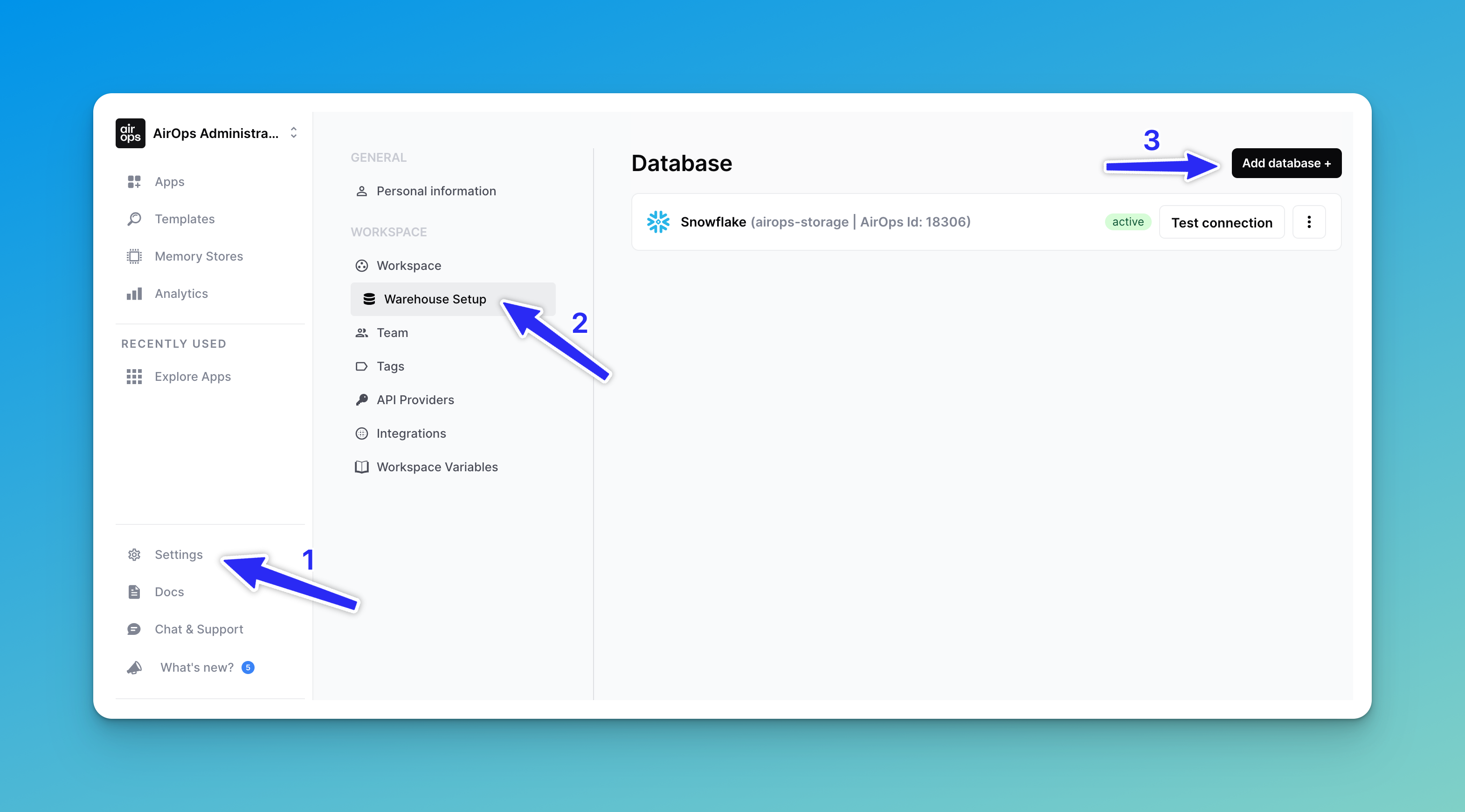
Para configurar una nueva conexión de fuente de datos, primero ve a la "**⚙️ Configuración"** pestaña del panel izquierdo, haz clic en "**Configuración del almacén,**" y luego selecciona el "**Añadir base de datos**" en la esquina superior derecha:
¡Luego, sigue nuestras páginas de guía específicas enlazadas arriba para conectar la integración que deseas!
---
# Agent Instructions
This documentation is published with GitBook. GitBook is the documentation platform designed so that both humans and AI agents can read, navigate, and reason over technical content effectively. Learn more at gitbook.com.
## Querying This Documentation
If you need additional information that is not directly available in this page, you can query the documentation by asking a question.
Perform an HTTP GET request on the following URL with the `ask` and `goal` query parameters:
```
GET https://docs.airops.com/docs/es/contexto/memory-stores/add-data/import-from-sql-database/data-sources.md?ask=&goal=
```
`ask` is the immediate question: it should be specific, self-contained, and written in natural language.
`goal` is what the user is ultimately trying to achieve, the reason they need the answer. Sharing it helps GitBook give you a better, more relevant answer. A goal is most helpful when it describes the outcome the user wants rather than restating the question. For example, with `ask=how do I create an API token`, a goal like `automate deployments from our CI pipeline` lets GitBook tailor the answer to that use case.
The response will contain a direct answer to the question and relevant excerpts and sources from the documentation.
Use this mechanism when the answer is not explicitly present in the current page, you need clarification or additional context, or you want to retrieve related documentation sections.