> For the complete documentation index, see [llms.txt](https://docs.airops.com/llms.txt). Markdown versions of documentation pages are available by appending `.md` to page URLs; this page is available as [Markdown](https://docs.airops.com/docs/de/kontext/memory-stores/add-data/import-from-shopify.md).
# Aus Shopify importieren
## Import aus Shopify
AirOps bietet eine nahtlose Integration mit Shopify, mit der Sie Produkte, Kollektionen und Artikel Ihres Shops direkt in Ihre Wissensdatenbank importieren können. Diese Integration ermöglicht leistungsstarke Anwendungsfälle wie automatisierte Produktkuratierung, Content-Erstellung mit Produktverweisen und intelligentes internes Verlinken.
### So importieren Sie Daten aus Ihrem Shopify-Shop
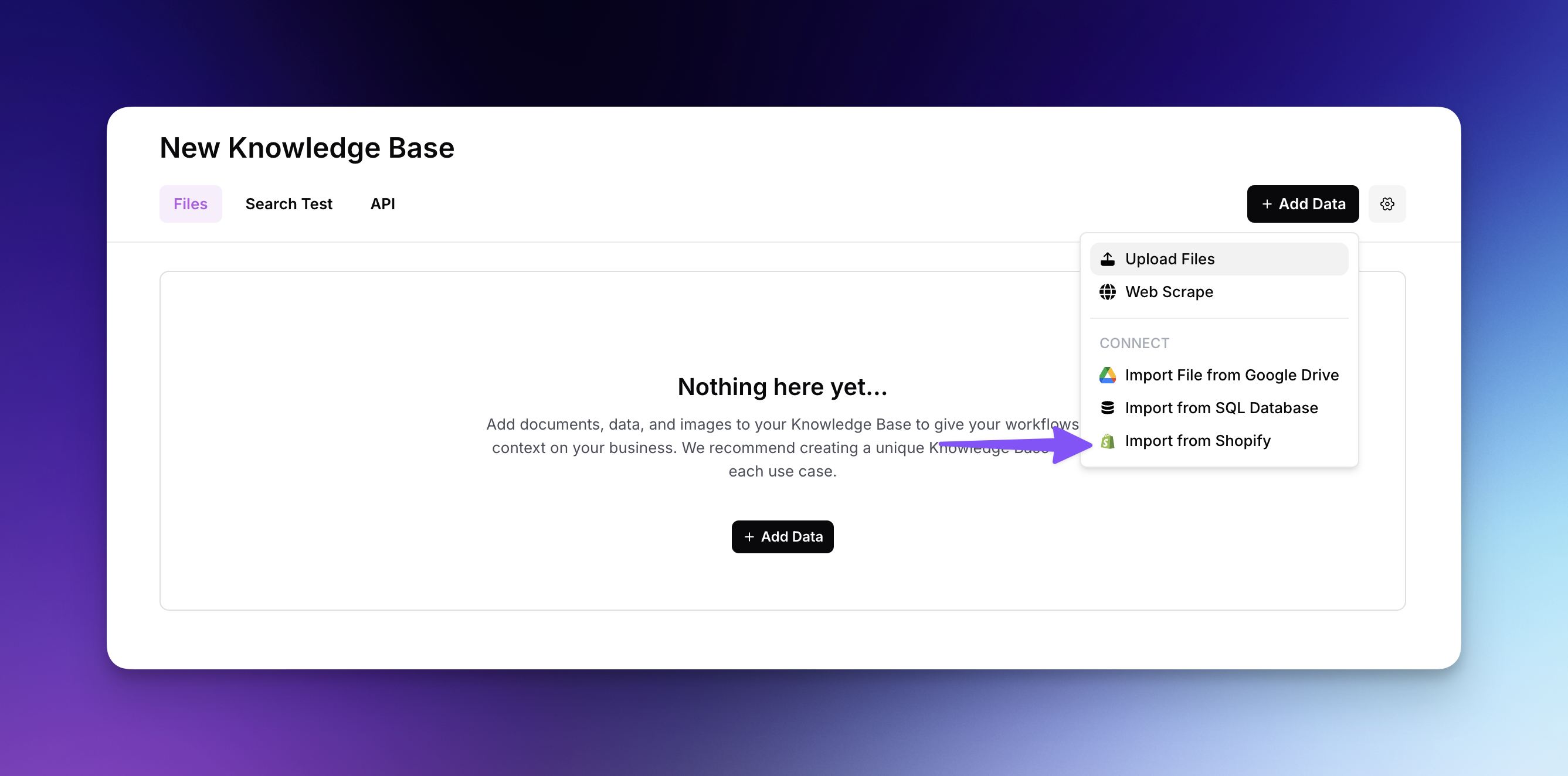
* Klicken Sie auf „Daten hinzufügen“ und wählen Sie im Dropdown-Menü „Aus Shopify importieren“ aus
* Schließen Sie den Authentifizierungsprozess ab, indem Sie sich in Ihr Shopify-Konto einloggen
* Installieren Sie die AirOps-App in Ihrem Shopify-Shop, wenn Sie dazu aufgefordert werden
* Wählen Sie Ihren verbundenen Shopify-Shop aus dem Dropdown-Menü in AirOps aus
* Wählen Sie aus, welche Datentypen importiert werden sollen: Produkte, Kollektionen oder Artikel
{% @arcade/embed url="" flowId="lAWQfALEAB4PEGRjQA2L" %}
### Spalten auswählen und Durchsuchbarkeit
Nachdem Sie Ihren Datentyp ausgewählt haben, müssen Sie konfigurieren, welche Attribute eingeschlossen werden sollen:
* Wählen Sie aus, welche Spalten in Ihren Import aufgenommen werden sollen (z. B. id, title, handle, description, featuredImage.url)
* Legen Sie fest, welche Spalten in Ihrer Wissensdatenbank durchsuchbar sein sollen
* Nicht durchsuchbare Spalten werden weiterhin in den Ergebnissen enthalten sein und können zum Filtern verwendet werden
### Ihren Import filtern
Um einzugrenzen, welche Elemente importiert werden sollen:
* Verwenden Sie Filter wie Veröffentlichungsstatus, Status, Tags, Mindestbestand, Produkttyp und Anbieter
* Geben Sie für jeden Filter spezifische Werte ein (z. B. bestimmte Tags wie „blau, Sommer“ oder Produkttypen wie „Snowboard, Skateboard“)
* Sehen Sie sich die gefilterten Ergebnisse in der Vorschau an, bevor Sie Ihren Import abschließen
* Klicken Sie auf „Weiter“, um die gefilterten Shopify-Inhalte zu Ihrer Wissensdatenbank hinzuzufügen
Nach dem Import werden Ihre Shopify-Daten semantisch durchsuchbar, sodass Ihre Workflows Produkte intelligent für benutzerdefinierte Kollektionen auswählen, relevante Produkte in redaktionellen Inhalten hervorheben, verwandte Artikel für internes Verlinken finden und vieles mehr können.
---
# Agent Instructions
This documentation is published with GitBook. GitBook is the documentation platform designed so that both humans and AI agents can read, navigate, and reason over technical content effectively. Learn more at gitbook.com.
## Querying This Documentation
If you need additional information that is not directly available in this page, you can query the documentation by asking a question.
Perform an HTTP GET request on the following URL with the `ask` and `goal` query parameters:
```
GET https://docs.airops.com/docs/de/kontext/memory-stores/add-data/import-from-shopify.md?ask=&goal=
```
`ask` is the immediate question: it should be specific, self-contained, and written in natural language.
`goal` is what the user is ultimately trying to achieve, the reason they need the answer. Sharing it helps GitBook give you a better, more relevant answer. A goal is most helpful when it describes the outcome the user wants rather than restating the question. For example, with `ask=how do I create an API token`, a goal like `automate deployments from our CI pipeline` lets GitBook tailor the answer to that use case.
The response will contain a direct answer to the question and relevant excerpts and sources from the documentation.
Use this mechanism when the answer is not explicitly present in the current page, you need clarification or additional context, or you want to retrieve related documentation sections.