> For the complete documentation index, see [llms.txt](https://docs.airops.com/llms.txt). Markdown versions of documentation pages are available by appending `.md` to page URLs; this page is available as [Markdown](https://docs.airops.com/docs/de/aktionen/workflow-concepts/workflow-steps/logic-steps/text.md).
# Liquid-Text schreiben
Formatieren Sie Ihre Ausgabe in einen String
## Wie funktioniert der Text-Schritt?
Der Text-Schritt ermöglicht es Benutzern, die Ausgaben vorheriger Schritte zu einem einzigen String zu verketten. Er wird am häufigsten als letzter Schritt in Ihrem Workflow verwendet, um sicherzustellen, dass Ihre endgültige Ausgabe genau so strukturiert ist, wie Sie es möchten.
{% hint style="info" %}
Text-Schritte sind auch eine großartige Option, um mehrere Werte aus Listen oder Arrays zu extrahieren, die Sie möglicherweise zu einem einzigen String verketten möchten.
{% endhint %}
## Wie konfiguriert man einen Text-Schritt?
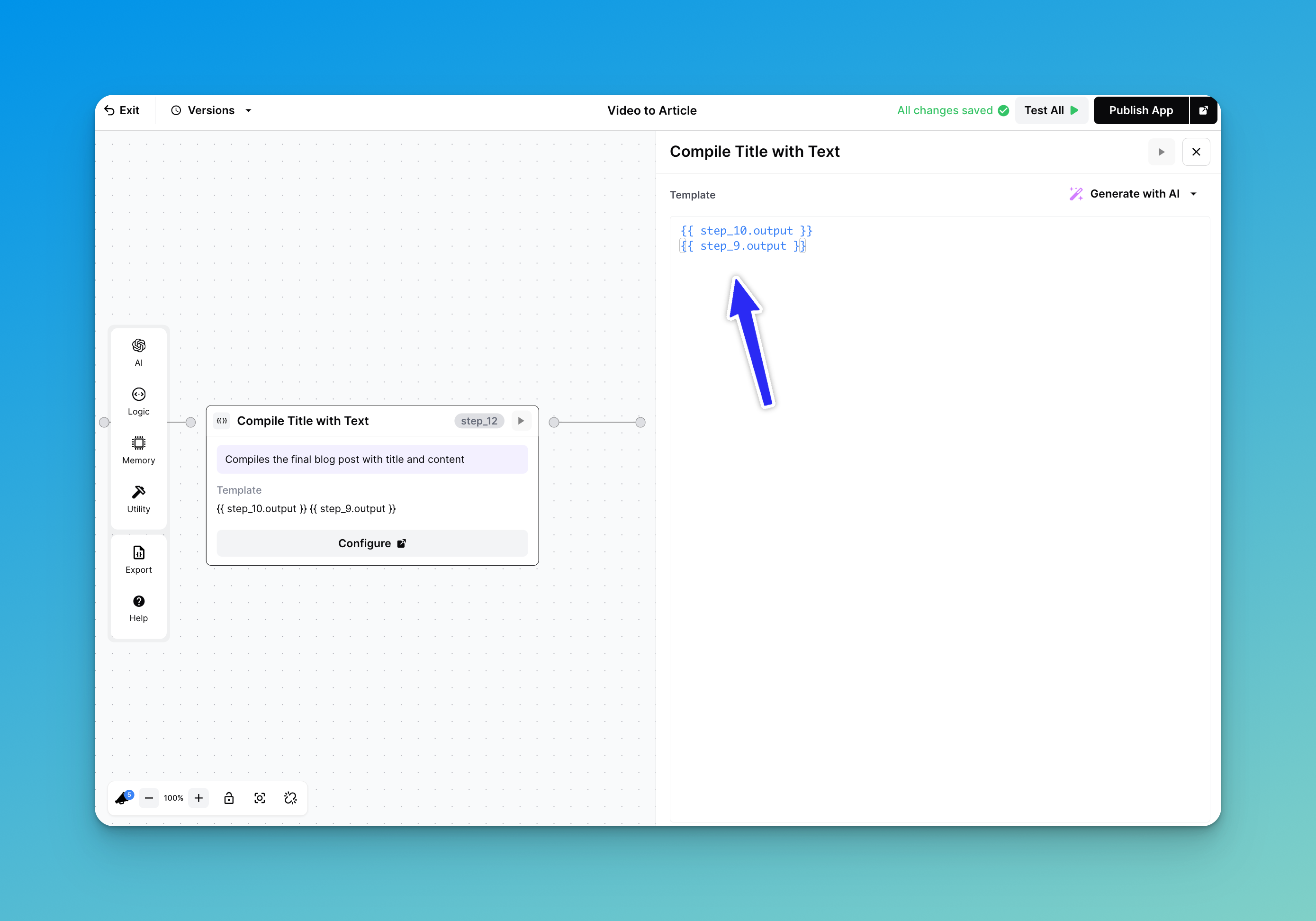
Die einfachste Implementierung eines Text-Schritts ist unkompliziert. Sie müssen lediglich die gewünschten Variablen oder Schritt-Ausgaben mithilfe der Liquid-Syntax referenzieren, wie unten gezeigt:
Rufen Sie Ihre vorherigen Schritte zusammen auf
In diesem Beispiel verkettet unser Text-Schritt Schritt 10 (Erstellung eines Titels) mit Schritt 9 (Erstellung des Artikelinhalts). Das Endergebnis ist also ein korrekt formatiertes Artikel mit dem Titel gefolgt vom Haupttext.
## Die Ausgabe eines Iterationsschritts verketten
Einer der beliebtesten Anwendungsfälle für einen Text-Schritt besteht darin, Werte aus einem Iterationsschritt zu extrahieren. Die allgemeine Formatierung dafür ist:
```
{% for chunk in step_x.output %}
{{chunk}}
{% endfor %}
```
wobei "step\_x" Ihren Iterationsschritt darstellt und "chunk" die Werte sind, die wir abrufen möchten. Schauen wir uns ein weiteres Beispiel an:
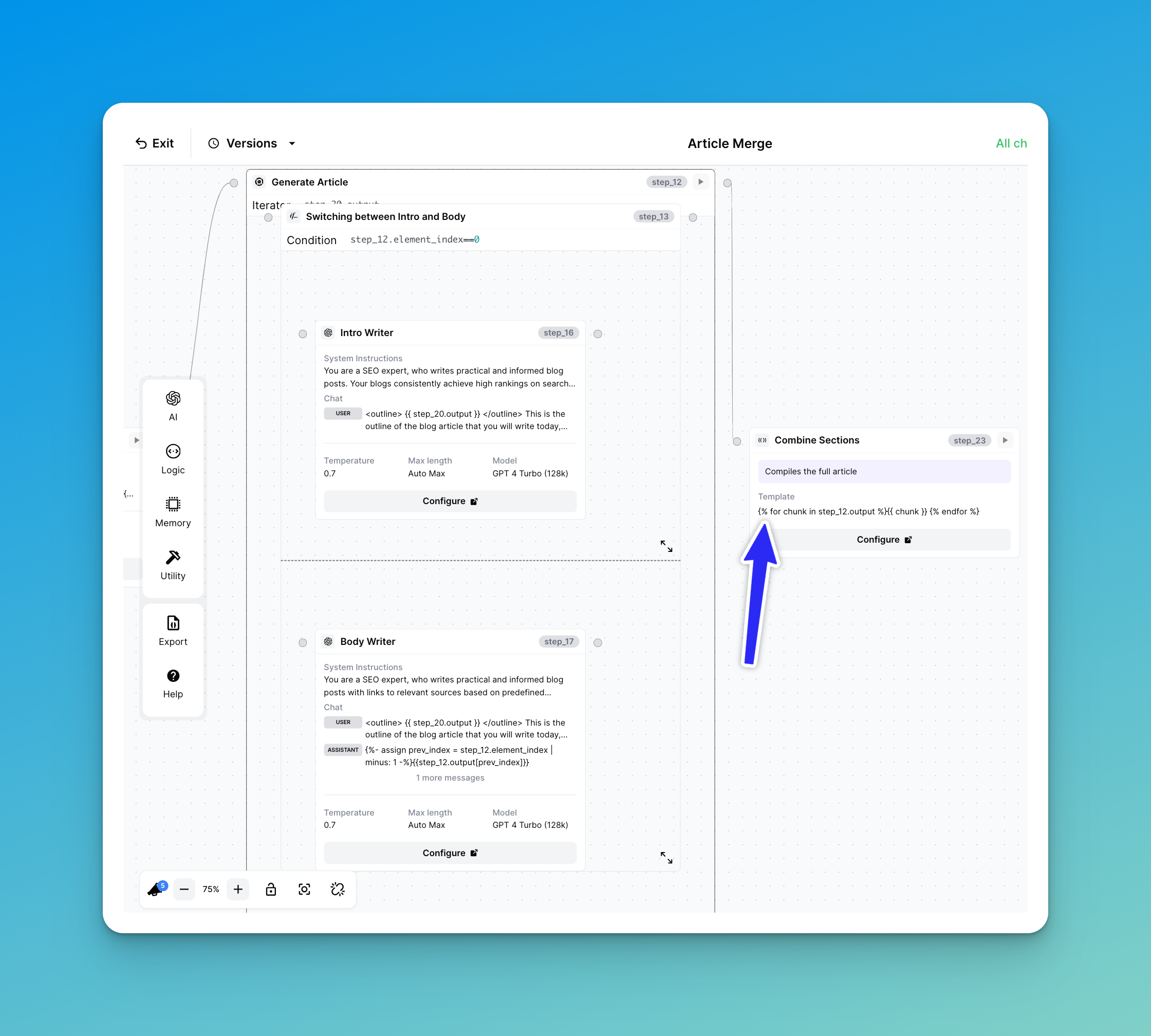
Aus dem Iterationsschritt abgerufene Werte verketten
Dies stammt direkt aus unserer Vorlage "Article Merge". Unser Iterationsschritt (step\_12) prüft, ob er eine Einleitung für unseren Artikel schreibt oder den Hauptteil des Artikels. Wenn wir unseren Text-Schritt wie folgt aufrufen:
```
{% for chunk in step_12.output %}
{{ chunk }}
{% endfor %}
```
Wir fassen die Ergebnisse jedes Teils effektiv zu einem einzigen String zusammen.
---
# Agent Instructions
This documentation is published with GitBook. GitBook is the documentation platform designed so that both humans and AI agents can read, navigate, and reason over technical content effectively. Learn more at gitbook.com.
## Querying This Documentation
If you need additional information that is not directly available in this page, you can query the documentation by asking a question.
Perform an HTTP GET request on the following URL with the `ask` and `goal` query parameters:
```
GET https://docs.airops.com/docs/de/aktionen/workflow-concepts/workflow-steps/logic-steps/text.md?ask=&goal=
```
`ask` is the immediate question: it should be specific, self-contained, and written in natural language.
`goal` is what the user is ultimately trying to achieve, the reason they need the answer. Sharing it helps GitBook give you a better, more relevant answer. A goal is most helpful when it describes the outcome the user wants rather than restating the question. For example, with `ask=how do I create an API token`, a goal like `automate deployments from our CI pipeline` lets GitBook tailor the answer to that use case.
The response will contain a direct answer to the question and relevant excerpts and sources from the documentation.
Use this mechanism when the answer is not explicitly present in the current page, you need clarification or additional context, or you want to retrieve related documentation sections.