> For the complete documentation index, see [llms.txt](https://docs.airops.com/llms.txt). Markdown versions of documentation pages are available by appending `.md` to page URLs; this page is available as [Markdown](https://docs.airops.com/actions/workflow-concepts/workflow-steps/web-research/web-page-scrape.md).
# Web Page Scrape
Scrape text, markdown or HTML from a website
The "Web Page Scrape" Step allows you to automate a text/markdown/HTML scrape from a specific URL. You can combine this with an Iteration Step to scrape through multiple websites, and parse the output separately.
## Configuring the "Web Page Scrape" Step
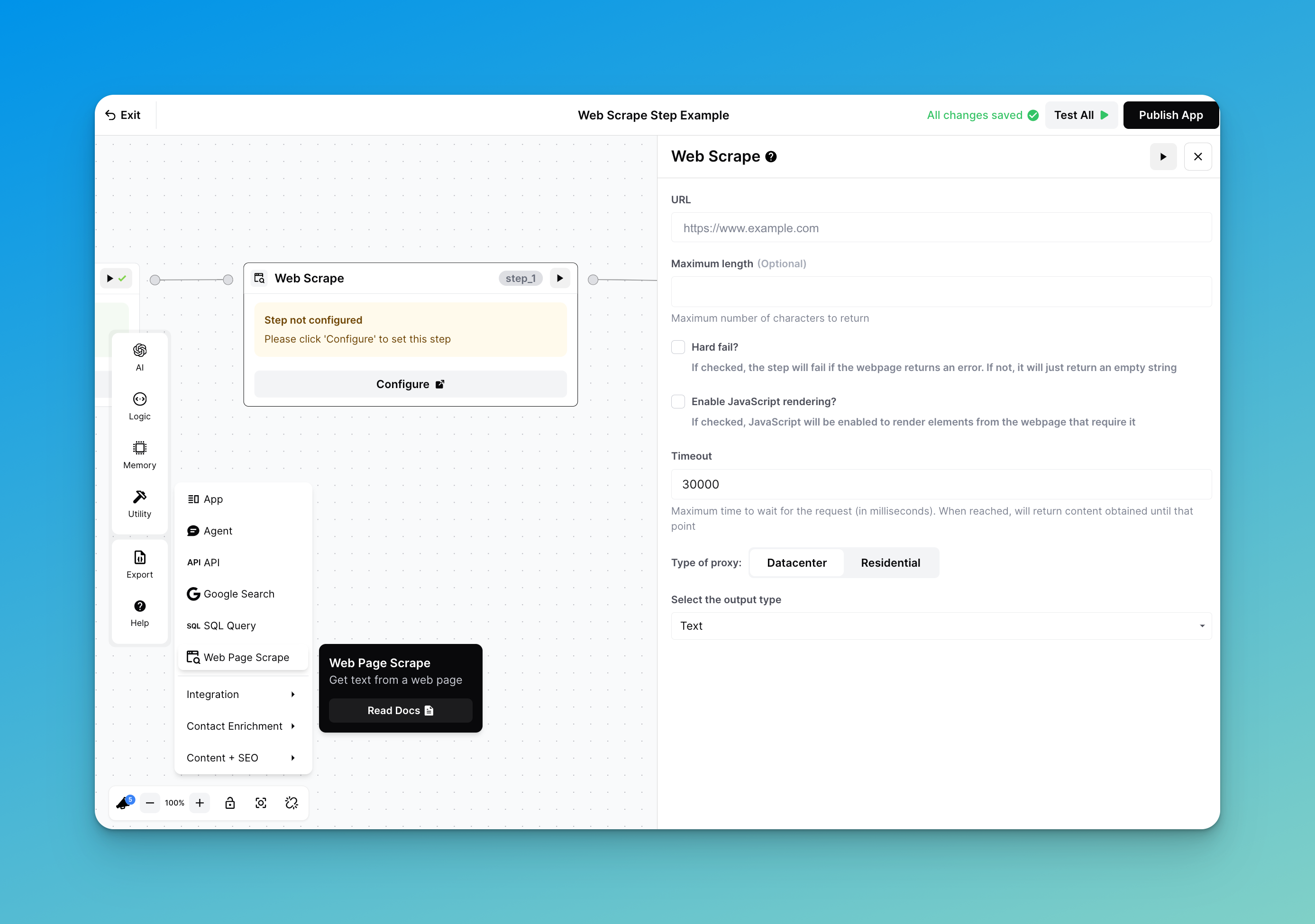
Configuring the step requires setting the parameters shown below:
Configure your Web Page Scrape parameters
### URL
Add the specific URL you want the step to scrape.
### Maximum Length
Optionally, you may limit the number of characters returned by the step.
This parameter can be helpful to limit the amount of text passed to a subsequent LLM step, which has a limited context window.
{% hint style="warning" %}
**1 token is approximately 4 characters in English.** To estimate the number of characters, you should pass to an LLM step, multiply the # of tokens you want to pass by 4.
{% endhint %}
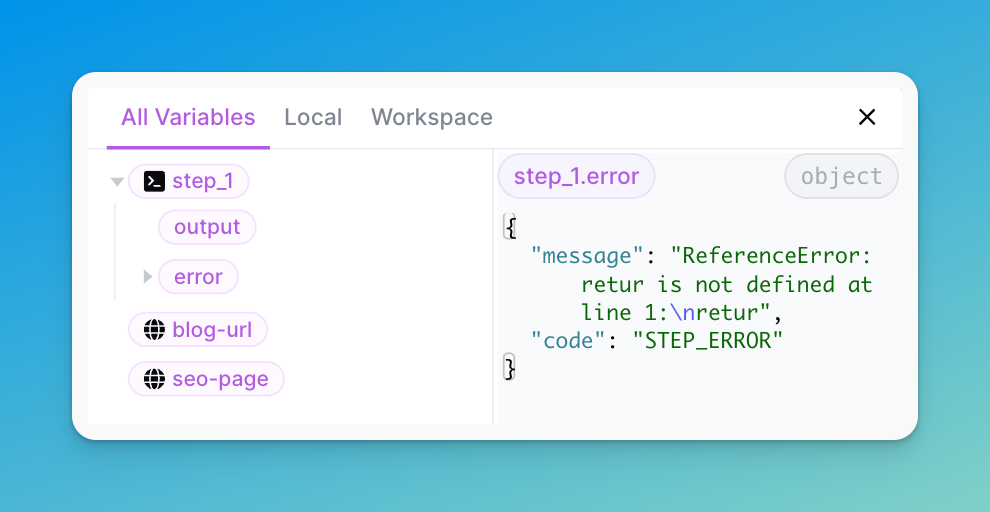
### How to continue if the Web Scrape step fails
By default, the code step will terminate the workflow if it fails. However, to continue the workflow if the step fails, simply click `Continue` at the bottom of the step.
Click continue to continue the workflow
The step will return the following keys:
* `output` : this will be `null`
* `error` :
* `message`: the message returned from the step
* `code` : the error code representing the error
### Enable Javascript rendering?
By default, the Web Page Scrape Step will not render websites that use Javascript.
Check this box to enable scraping from websites that use Javascript to help render dynamic content (examples include Facebook, Airbnb, and more).
### Timeout
The maximum time to wait for your webscraped results to return in milliseconds.
### Type of Proxy:
Use the **residential proxy** for sites that require more reliability and higher success rates. On the other hand, use the **datacenter proxy** where reliability and success rates are not a concern.
**Datacenter:**
* Private IP addresses that are housed in data centers
* Offer higher speed but they are less reliable in terms of anonymity
* More likely to be detected and blocked by websites and internet services.
#### Residential
* A real IP address attached to a physical location
* Webscraping will appear as if it's coming from a residential home in a certain location
* Considered more legitimate and less likely to be blocked by websites
{% hint style="info" %}
Note: Using a residential proxy is more expensive than using the datacenter, so it's good to measure this against your use-case when deciding which proxy to use.
{% endhint %}
#### Headers
Use this field to pass custom headers for the web scrape request. Ensure the headers are formatted as valid JSON. For example:
```javascript
{
"authorization": "Bearer YOUR_API_KEY",
"Content-Type": "{{ a_variable }}"
}
```
### Output Type
* **Text:** No formatting included
* **HTML:** Extract headers and formatting from a website in HTML
* **Markdown:** Extract the headers from a website in markdown
---
# Agent Instructions
This documentation is published with GitBook. GitBook is the documentation platform designed so that both humans and AI agents can read, navigate, and reason over technical content effectively. Learn more at gitbook.com.
## Querying This Documentation
If you need additional information that is not directly available in this page, you can query the documentation by asking a question.
Perform an HTTP GET request on the following URL with the `ask` and `goal` query parameters:
```
GET https://docs.airops.com/actions/workflow-concepts/workflow-steps/web-research/web-page-scrape.md?ask=&goal=
```
`ask` is the immediate question: it should be specific, self-contained, and written in natural language.
`goal` is what the user is ultimately trying to achieve, the reason they need the answer. Sharing it helps GitBook give you a better, more relevant answer. A goal is most helpful when it describes the outcome the user wants rather than restating the question. For example, with `ask=how do I create an API token`, a goal like `automate deployments from our CI pipeline` lets GitBook tailor the answer to that use case.
The response will contain a direct answer to the question and relevant excerpts and sources from the documentation.
Use this mechanism when the answer is not explicitly present in the current page, you need clarification or additional context, or you want to retrieve related documentation sections.