> For the complete documentation index, see [llms.txt](https://docs.airops.com/llms.txt). Markdown versions of documentation pages are available by appending `.md` to page URLs; this page is available as [Markdown](https://docs.airops.com/actions/workflow-concepts/workflow-steps/seo-research/google-search-console.md).
# Google Search Console
AirOps allows you to connect directly to your Google Search Console account to get valuable search performance data within your workflows, helping you make data-driven decision with your content.
### How to Configure the Google Search Console Integration Step
1. **Add the step to your workflow**:
* Click the "+" button to add a new step
* Select "Google Search Console" under the "Integrations" section from the available steps
2. **Authentication**:
* Select an existing Google Search Console connection from the dropdown, or set up a new one
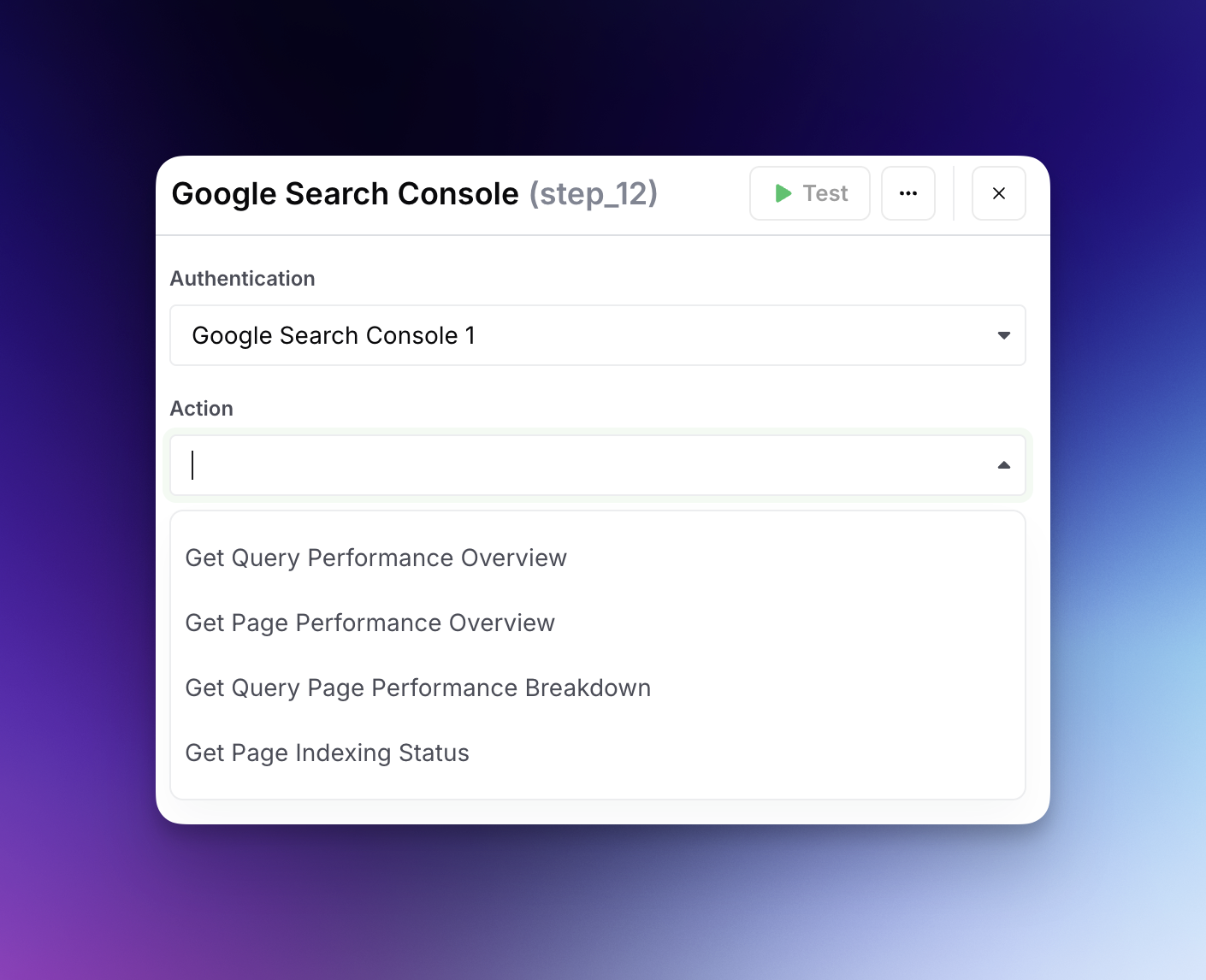
3. **Action Type**:
* Choose from the following available actions:
* **Get Query Performance Overview**: Retrieves performance data for search queries that led to your site
* **Get Page Performance Overview**: Retrieves performance data for specific pages on your site
* **Get Query Page Performance Breakdown**: Provides detailed performance metrics between queries and pages
* **Get Page Indexing Status**: Checks if a specific URL is indexed by Google and when it was last indexed
4. **Configure action-specific parameters**:
* **Site Selection**: Choose which Google Search Console property to query
* **URL**: For page-specific actions, enter the URL you want to analyze
* **Period**: For performance data, select the time frame from preset options:
* Last 7 days
* Last 28 days
* Last 30 days
* Last 60 days
* Last 90 days
* Last 3 months
* Custom date range
5. **Output formats vary by action type**:
* **Query Performance**: Returns data including query text, clicks, impressions, CTR, and position in the following JSON format
```
{
"queries": [
{
"query": "string", // The search query text
"clicks": number, // Count of clicks from this query
"impressions": number, // Count of impressions for this query
"ctr": number, // Click-through rate (decimal format)
"position": number // Average position in search results
}
// Multiple query objects will be returned
]
}
```
* **Page Performance**: Returns data about specific pages including clicks, impressions, and ranking
```
{
"clicks": {
"L7D": number, // Total clicks in the Last 7 Days
"L30D": number, // Total clicks in the Last 30 Days
"WoW Change": number, // Week-over-Week change in clicks (can be positive or negative)
"MoM Change": number // Month-over-Month change in clicks (can be positive or negative)
},
"impressions": {
"L7D": number, // Total impressions in the Last 7 Days
"L30D": number, // Total impressions in the Last 30 Days
"WoW Change": number, // Week-over-Week change in impressions
"MoM Change": number // Month-over-Month change in impressions
},
"ctr": {
"L7D": number, // Average Click-Through Rate for the Last 7 Days (expressed as percentage)
"L30D": number, // Average Click-Through Rate for the Last 30 Days (expressed as percentage)
"WoW Change": number, // Week-over-Week change in CTR (percentage points)
"MoM Change": number // Month-over-Month change in CTR (percentage points)
},
"position": {
"L7D": number, // Average position in search results for the Last 7 Days
"L30D": number, // Average position in search results for the Last 30 Days
"WoW Change": number, // Week-over-Week change in position (negative change is improvement)
"MoM Change": number // Month-over-Month change in position (negative change is improvement)
}
}
```
* **Query Page Breakdown**: Shows how specific queries perform for specific pages
```
{
"queries": [ // Array of query objects
{
"query": "string", // The specific search query text being analyzed
"clicks": number, // Total clicks received from this query across all pages
"impressions": number, // Total impressions for this query across all pages
"ctr": number, // Overall click-through rate for the query (expressed as percentage)
"position": number, // Average position in search results for this query
"ranking_pages": [ // Array of pages that rank for this query
{
"url": "string", // Full URL of the ranking page
"clicks": number, // Number of clicks this specific page received for this query
"impressions": number, // Number of impressions this page received for this query
"ctr": number, // Page-specific click-through rate (expressed as decimal)
"position": number, // Average position of this page for this query
"clicks_percent_total": number, // Percentage of total query clicks going to this page
"impressions_percent_total": number // Percentage of total query impressions going to this page
}
// Multiple page objects will be returned, sorted by clicks in descending order
]
},
// Multiple query objects will be returned, typically sorted by clicks in descending order
],
"metadata": {
"start_date": "string", // ISO format date marking the beginning of the reporting period
"end_date": "string", // ISO format date marking the end of the reporting period
"queries": number, // Total number of unique queries analyzed in this report
"urls": number // Total number of unique URLs that appeared in search results
}
}
```
* **Indexing Status**: Returns whether a page is indexed, along with the last crawl date in the following JSON format
```
{
"last_crawled_at": "string", // Timestamp of the last crawl
"indexed": boolean // Whether the page is indexed
}
```
---
# Agent Instructions
This documentation is published with GitBook. GitBook is the documentation platform designed so that both humans and AI agents can read, navigate, and reason over technical content effectively. Learn more at gitbook.com.
## Querying This Documentation
If you need additional information that is not directly available in this page, you can query the documentation by asking a question.
Perform an HTTP GET request on the following URL with the `ask` and `goal` query parameters:
```
GET https://docs.airops.com/actions/workflow-concepts/workflow-steps/seo-research/google-search-console.md?ask=&goal=
```
`ask` is the immediate question: it should be specific, self-contained, and written in natural language.
`goal` is what the user is ultimately trying to achieve, the reason they need the answer. Sharing it helps GitBook give you a better, more relevant answer. A goal is most helpful when it describes the outcome the user wants rather than restating the question. For example, with `ask=how do I create an API token`, a goal like `automate deployments from our CI pipeline` lets GitBook tailor the answer to that use case.
The response will contain a direct answer to the question and relevant excerpts and sources from the documentation.
Use this mechanism when the answer is not explicitly present in the current page, you need clarification or additional context, or you want to retrieve related documentation sections.